

ACDSee Photo Studio Professional 2025

Delivery within 24 hours via email
 Free
Free
 Authentic Code
 Download Link
 EN
EN
 Windows
 Lifetime
 Worldwide
 Full Version

Guaranteed Authenticity
All our softwares are 100% authentic, directly from official manufacturers.
Warranty
Enjoy peace of mind with our during the product's validity warranty, far beyond the standard 30 days.
Free Installation
Enjoy a free installation service for a hassle-free setup.
24/7 Customer Support
Our dedicated team is available anytime to assist you.
Best Prices
Get the best prices: AUD126.99!
Description
ACDSee Photo Studio Professional 2025: Overview
Experience a new level of creative control with ACDSee Photo Studio Professional 2025. This latest release combines high-performance AI technology with advanced RAW editing tools and intuitive digital asset management to elevate your photography workflow.
- AI-enhanced workflow tools for smarter, faster photo editing.
- Professional-grade non-destructive RAW editing with precision masking.
- Simplified image organization through facial recognition and smart keyword tagging.
- New AI Super-Resolution to upscale images while maintaining sharpness.
- Streamlined digital asset management with multi-tab support and background task processing.
ACDSee Photo Studio Professional 2025: Advanced Features Powered by AI
Facial Recognition & Face Detection
Thanks to integrated AI, ACDSee identifies and learns faces across your photo collection. As you tag individuals, the software becomes more accurate, allowing for fast, effortless organization and person-based searches. It's the ultimate tool for managing personal or event-focused photo libraries.

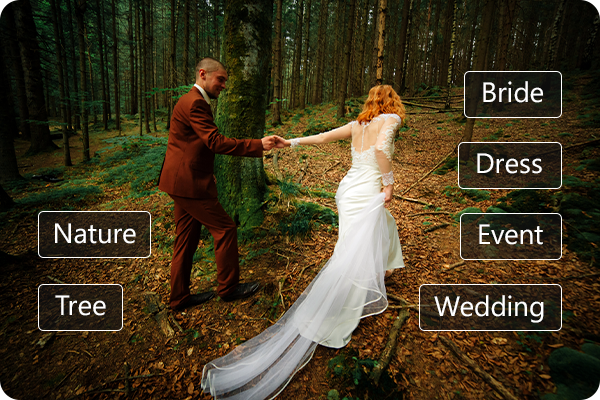
AI Keywords
Manually tagging images is a thing of the past. With AI Keywords, ACDSee automatically detects and assigns descriptive terms to your photos. Quickly locate your beach trips, pet portraits, or food photos by simply typing a keyword—no sorting or scrolling required.
RAW Photo Editing
Work confidently with non-destructive RAW tools that preserve your original images. The revamped Masking Group introduces a suite of AI-powered features—like Object Masking and AI Sky—enabling highly selective adjustments. Refine lighting, correct color, and remove noise with advanced tools including Tone Wheels and Light EQ™.


Simplified Photo Merging
Merge multiple photos into one stunning final image with ease. Use Photomerge to create seamless panoramas, vivid HDR compositions, or deep-focus stacked images. Ideal for scenery, architecture, and macro shots, this toolset expands creative possibilities in just a few clicks.
ACDSee Photo Studio Home 2025: Latest Innovations
Explore the latest advancements integrated into ACDSee Photo Studio Home 2025. From cutting-edge AI-powered tools to refined editing workflows, this version empowers photographers of all levels with professional-grade capabilities—all while keeping your images secure on your local device.


Harness GPU-Driven AI Performance
ACDSee Photo Studio Home 2025 takes full advantage of your system's GPU to deliver ultra-fast AI-powered editing. Tools like AI Super-Resolution now operate with significantly enhanced speed, allowing you to perform complex enhancements effortlessly. All AI processing is done locally, meaning your images and data remain securely stored on your device—no cloud uploads, no privacy concerns.
Intelligent Image Upscaling Made Easy
With AI Super-Resolution, you can intelligently upscale your images while reducing noise, eliminating blur, and preserving fine details. Whether you're preparing photos for large-scale prints or breathing new life into vintage snapshots, this tool ensures crystal-clear results. You can even process multiple images simultaneously using the Batch AI Super-Resolution function.


Advanced Masking with Local AI Precision
The newly designed Masking Group in Develop Mode provides a central hub for your masking workflow. Access powerful tools like AI Object Masking, Color Range, and Luminance Range with ease. These features enable refined, non-destructive edits, allowing you to highlight vibrant colors or dramatic lighting transitions. Fine-tune your masks with blending options such as Feathering and Shift controls.
Redefine Landscapes with Smart Sky Replacement
Redefine your landscapes with AI Sky Replacement. Swap skies effortlessly to match your creative vision, using a range of new presets including Overcast and Fireworks. Whether you're enhancing a moody fall scene or adding a celebratory glow to your night skies, the tool ensures a seamless and realistic final image. You can also import your own skies to personalize each project.
System Requirements
Hardware:
- Processor: Intel® or AMD® with 64-bit support (Intel i5 or better recommended)
- RAM: 4 GB minimum (8 GB or more recommended)
- Video RAM: 512 MB minimum (2 GB or more recommended)
- Graphics: DirectX 10 compatible (DirectX 12 with feature level 12_0 or later recommended)
- Display: 1280 x 800 resolution (1920 x 1080 recommended)
- Storage: 4 GB of available space
Software:
- Operating System: Windows® 10 (64-bit) & Windows® 11
- Additional Requirements: Microsoft® Edge®, DirectX® 10 or higher, Windows Media® Player 9.0, Microsoft® Office 2010 or newer
- Internet: Required for software activation, validation, and access to certain features
Frequently Asked Questions
-
Is ACDSee Photo Studio Professional 2025 suitable for beginners?
Absolutely. With its user-friendly interface and AI-powered assistance, even beginners can navigate editing and organizational tools easily. It offers helpful guidance throughout the process, making it ideal for users at any skill level.
-
Can I edit RAW files with this software?
Yes, ACDSee offers a robust non-destructive RAW editing environment. You can apply advanced adjustments like color correction, noise reduction, and detailed masking while keeping your original files untouched.
-
Does ACDSee work without an internet connection?
Most of the features function offline. However, an internet connection is necessary for the initial activation and periodic updates or access to certain cloud-linked services.
-
How do I download and activate ACDSee Photo Studio Professional 2025?
Once your purchase is complete, you'll receive a secure download link and a valid license key via email. Follow the installation instructions, enter your product key, and you'll be ready to use ACDSee Photo Studio Professional 2025 right away.



